Skip to content

How the web works

docs.scrimba.com

Every page you open follows the same short journey. You ask for something by its address, a machine somewhere sends back a text document, and your browser turns that text into the page you see. HTML is the language that text is written in, so understanding the trip it makes is the backdrop for everything else in this handbook.

Client and server

The web is a conversation between two sides. Your browser is the client: the program that asks for pages. The machine that holds a website and hands it over is the server. You ask, it answers.

Think of ordering at a restaurant. You are the customer, the kitchen is out of sight, and a waiter carries your order back and forth. You do not walk into the kitchen and cook. You ask for a dish, and the kitchen prepares it and sends it out. Your browser is the customer, the server is the kitchen, and the web is the waiter running between them.

Every page load is a client talking to a server. The client is the program making the request, almost always a browser, but it can also be a mobile app or a command line tool. The server is a program running on a machine somewhere, waiting for requests and sending back responses.

The relationship is one directional to start: the client always speaks first. A server does not push a page at you out of nowhere. It sits and waits until a client asks for something, then it replies. One server answers thousands of clients at once, which is why a single website can serve many visitors from the same address.

Client and server are roles, not fixed machines. A client is whatever initiates a request; a server is whatever listens for requests and returns responses. The same physical computer can be a server for one connection and a client for another, for example a web server that itself calls a database.

The model is request driven and stateless at its core. Stateless means the server treats each request as complete on its own: nothing about the previous request is remembered by default. This is why signing in has to be re-established on later requests, usually with a cookie or token that the client sends along each time, because the connection itself carries no memory. Keeping the protocol stateless is what lets one server scale to enormous traffic, since it does not hold an open thread of context for every visitor between requests.

JunoClient and server Two sides, one conversation: your browser is the client that asks, the server is the machine that answers. Like a customer and a kitchen with a waiter in between, you never step into the kitchen, you place the order and the food comes out. Hold onto that picture, everything else on this page is a version of it.
JunoClient and server Client asks, server answers, and the client always speaks first. One server handles many clients at once, which is how a single address serves a whole crowd of visitors. When something loads, you are watching one round of that back and forth.
JunoClient and server Client and server are roles, not boxes, and the same machine can play both. The web is stateless by default, so the server remembers nothing between requests unless the client resends proof each time, which is what a cookie or token is doing. That statelessness is not a limitation to work around, it is what lets one server hold up under real traffic.

URLs and domains

The address you type is a URL: a Uniform Resource Locator. It is the full address of one thing on the web, the way a postal address points to one house.

Look at https://scrimba.com/learn. The https part is how the browser should talk to the server. The scrimba.com part is the domain, the name of the website, like the street and town. The /learn part is the path to one particular page, like the house number. Together they point at exactly one page, and typing them tells the browser where to go.

A URL is made of parts, and naming them makes the whole thing easier to read. Take https://scrimba.com/learn/html:

  • https is the scheme: the protocol the browser uses to fetch the page.
  • scrimba.com is the domain: the human readable name of the site.
  • /learn/html is the path: which page on that site.

The domain is a friendly stand in for a number. Every server is reachable at an IP address, a string like 192.0.2.10, and the domain name is what saves you from memorising it. When you type a domain, the browser looks up its IP address through the DNS, the Domain Name System, which works like a phone book turning names into numbers.

A URL encodes everything the browser needs to locate a resource, and each segment has a job. In https://shop.example.com:443/products?id=42#reviews: the scheme is https, shop is a subdomain, example.com is the registered domain, 443 is the port, /products is the path, ?id=42 is the query string, and #reviews is the fragment.

The port is the numbered door on the server (443 is the default for HTTPS, so it is usually omitted). The query string passes parameters to the server, which can change what it returns. The fragment after # is handled by the browser alone and never sent to the server; it points at a location within the page. Resolving the domain to an IP address goes through DNS (the Domain Name System, the web's directory of names to numbers), and that lookup is itself a network round trip, so a cold DNS resolution is latency the user pays before a single byte of the page arrives. Knowing the anatomy is practical: it tells you what the server can see (path and query), what it cannot (the fragment), and where a slow first load can hide.

JunoURLs and domains A URL is the full address of one page. The https says how to talk to the server, the domain like scrimba.com is the site's name, and the path like /learn points at one page on it. Read it left to right and it tells you exactly where the browser is headed.
JunoURLs and domains A URL breaks into scheme, domain, and path, and once you see those parts you can read any address at a glance. The domain is a friendly name for a number: DNS is the phone book that turns scrimba.com into an IP address the browser can actually reach. That lookup happens quietly before the page loads.
JunoURLs and domains Every part of a URL earns its place: scheme, subdomain, domain, port, path, query, fragment. The server sees the path and query but never the fragment, since the part after # stays in the browser. And DNS resolution is a real round trip, so a cold lookup is latency the user pays before the first byte, which is worth remembering when a first load feels slow.

The request and response cycle

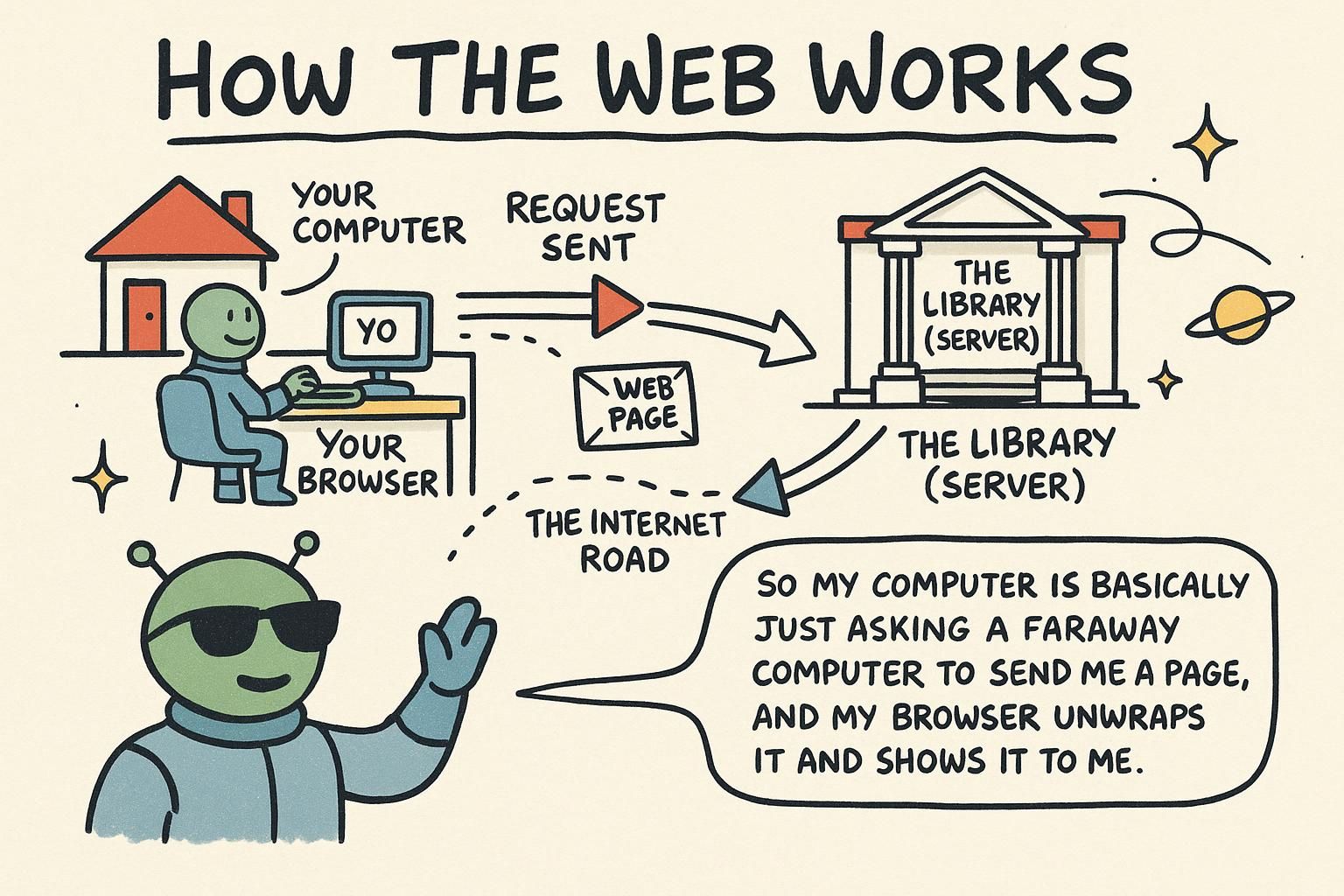
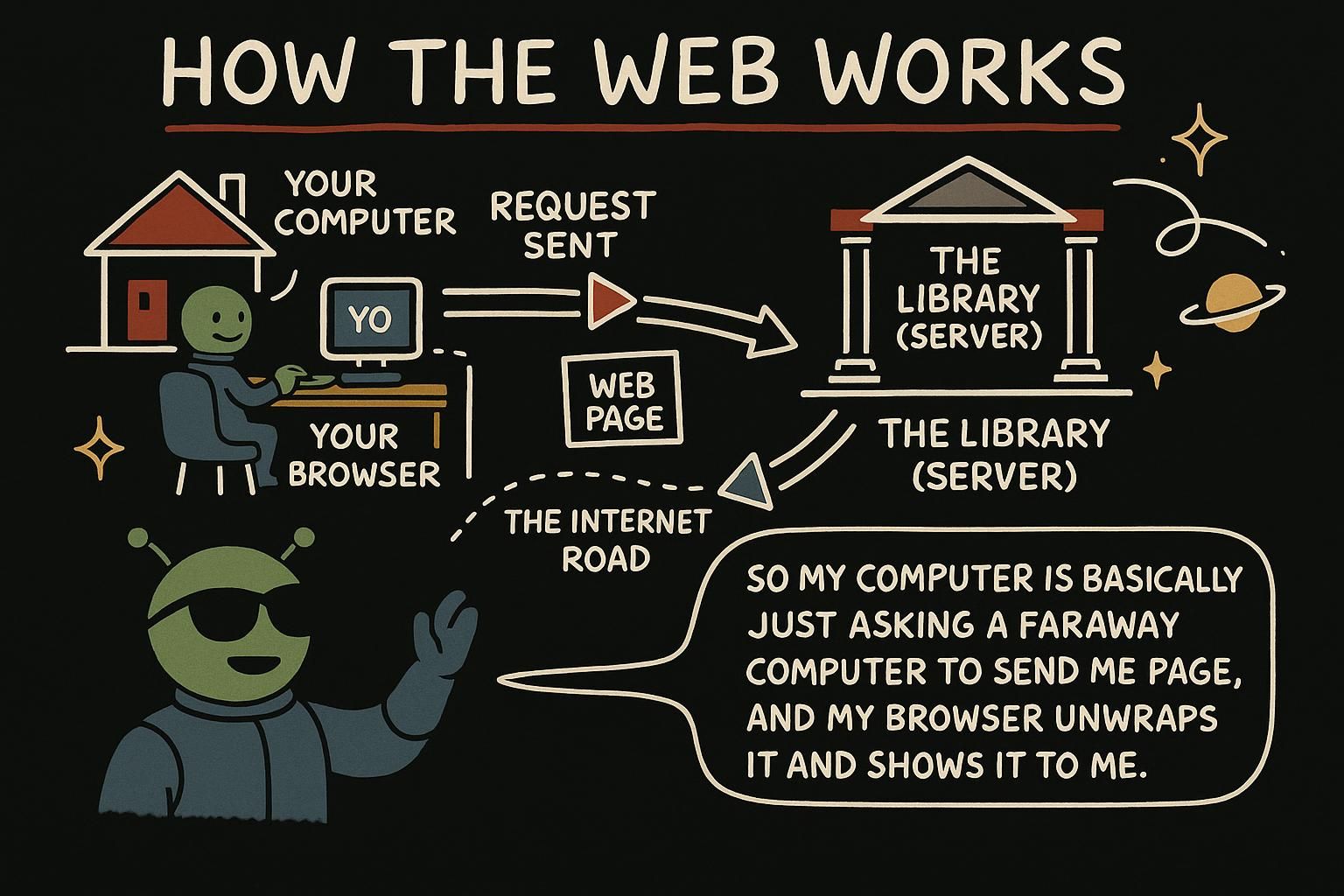
When you press enter, your browser sends a request to the server: a short message that says "please send me this page". The server sends back a response: the page itself. That there and back is one full trip, and it is what happens every single time you open a page or click a link.

Picture asking a librarian for a book. You give the title (your request), the librarian finds it and hands it over (the response), and now you have it in your hands. If the book does not exist, the librarian tells you that instead, which is a reply too. The web works the same way, far faster and many times a second.

A page load is one request and one response. The browser sends a request naming the page it wants and how it wants it; the server sends back a response containing the page, plus a status code that says how the request went.

You will see three status codes constantly, so learn these first:

  • 200 OK: it worked, here is what you asked for.
  • 404 Not Found: the server is fine, but there is nothing at that address.
  • 301 Moved Permanently: this page now lives somewhere else, and the browser should follow to the new address.

What the server sends back for a normal page is not a picture of the page. It is a plain text document written in HTML, the same tags you write by hand. The browser receives that text and builds the visible page from it.

The request and response cycle is defined by HTTP, the HyperText Transfer Protocol: the agreed set of rules for how a client and server phrase their messages. A request carries a method (the verb: GET to fetch, POST to send data), a path, and headers (name and value pairs of metadata, for example which formats the client accepts). The response carries a status code, its own headers, and usually a body, the actual content.

Status codes come in ranges, and the range tells you who to look at. 2xx is success (200 OK). 3xx is redirection (301 Moved Permanently tells the browser and search engines the resource has a new canonical address, so it is worth getting right for SEO). 4xx is a client error, meaning the request was wrong (404 Not Found, 403 Forbidden). 5xx is a server error, meaning the request was fine but the server failed (500 Internal Server Error). The distinction is practical: a 4xx points you at the request, a 5xx points you at the server. The response body for a document is HTML text, and the Content-Type header is what tells the browser to treat it as HTML rather than plain text or an image. One more line worth knowing: HTTP sends everything readable over the wire, while HTTPS wraps the same protocol in encryption so nobody in between can read or tamper with it, which is why every real site uses HTTPS today.

JunoThe request and response cycle Every page is a there and back: your browser sends a request that says please send me this, and the server sends a response with the page. Like asking a librarian for a book and getting it handed over, or being told it is not here. That round trip happens every time you open a page, quietly and fast.
JunoThe request and response cycle One request out, one response back, with a status code attached. Learn 200 (worked), 404 (nothing at that address), and 301 (moved, follow me) first, they cover most of what you will see. And remember what actually comes back for a page is plain HTML text, not a picture, which the browser then builds into the view.
JunoThe request and response cycle HTTP is the grammar of the trip: a request has a method, path, and headers, a response has a status code, headers, and a body. Read status codes by range, a 4xx means fix the request, a 5xx means the server fell over, and that split tells you where to look. The body is HTML text tagged by Content-Type, and HTTPS is HTTP with encryption wrapped around it, which is why every real site uses it.

What the browser does with the HTML it receives

The response is a page's worth of HTML text. Your browser reads that text from top to bottom and draws it on screen: it sees a heading tag and shows big bold text, it sees a paragraph tag and shows a line of body text, it sees an image tag and fetches the picture.

You can think of it like reading a recipe and cooking it. The text is not the meal, it is the description of the meal, and the browser is the cook that turns the description into something you can actually see and use. The same HTML always produces the same page, because the browser follows the same instructions every time.

The browser does not show the HTML text, it builds a page from it. As it reads the document top to bottom, it turns the tags into the DOM, the Document Object Model: a live tree of the page's elements held in memory. The DOM is what actually gets displayed and what CSS and JavaScript later read and change.

Order matters here. The browser reads the document in the order you wrote it, so a <script> or a stylesheet near the top is dealt with before the content below it. This is the practical reason pages put information about the page in the <head> and their visible content in the <body>, and why where you place a tag affects when its effect happens. You are not just listing elements, you are handing the browser a reading order.

Turning HTML into pixels is a pipeline, and knowing its shape tells you why some pages paint slower than others. The browser parses the HTML text (reads it and builds structure) into the DOM (the Document Object Model: the in-memory tree of every element). It parses CSS into a parallel tree, combines the two, works out the geometry (layout: where each box sits), and finally paints pixels to the screen.

Because the parser reads top to bottom, placement changes timing. A resource is render blocking when the browser will not paint content until it has finished with that resource. A stylesheet in the <head> is render blocking by design, so the page does not flash unstyled, but a slow one holds up the whole first paint. A classic <script> in the <head> is worse: the parser stops, downloads and runs the script, then resumes, so a script high in the document delays every element below it (the defer and async attributes exist to break that block). This is why document order and <head> placement decide what paints first: everything above a blocking resource waits on it.

That connects to latency, the time a byte takes to travel to the user, which no amount of local speed removes. Every request has a round trip cost, so fewer requests and smaller, earlier bytes mean the page starts painting sooner. The lever you control in the HTML is order: put what the user needs to see first high in the document, keep blocking resources out of its way, and the first meaningful paint arrives earlier. Fewer and earlier bytes is the whole performance game at this layer.

JunoWhat the browser does with the HTML it receives The HTML that comes back is a description of the page, and the browser is the cook that turns it into the real thing. It reads top to bottom: heading tag, big bold text, paragraph tag, body text, image tag, fetch the picture. Same HTML in, same page out, every time.
JunoWhat the browser does with the HTML it receives The browser reads your HTML top to bottom and builds the DOM, a live tree of elements that is what actually gets shown. Because it reads in order, where you put a tag decides when it takes effect, which is the real reason for the head and body split. You are handing the browser a reading order, not just a pile of elements.
JunoWhat the browser does with the HTML it receives Parse to DOM, combine with CSS, lay out, paint: that pipeline is why placement changes timing. Anything above a render blocking resource waits on it, so a slow stylesheet or a plain <script> in the head holds up the first paint, which is what defer and async are for. Add latency you cannot remove, and the move is always the same, fewer and earlier bytes, with what matters most high in the document.