

Skip to content
This page has been auto-translated and may contain errors.View in English

कक्षाएँ और वस्तुएँ

docs.scrimba.com

आप अब तक जो भी प्रकार के साथ काम कर चुके हैं (strings, lists, dictionaries) वास्तव में एक कक्षा है। जब आप "hello".upper() को कॉल करते हैं, तो आप एक string ऑब्जेक्ट पर एक विधि को कॉल कर रहे हैं। कक्षाएँ आपको अपने स्वयं के प्रकार को परिभाषित करने देती हैं जिनके अपने डेटा और व्यवहार हों। एक Player कक्षा एक नाम, एक स्कोर, और एक स्तर रख सकती है, और जानती है कि अपने आप को कैसे प्रदर्शित करना है।

कक्षाएँ उपयोगकर्ता-परिभाषित प्रकारों के लिए यंत्र हैं। एक कक्षा एक टेम्पलेट को परिभाषित करती है: डेटा जो प्रत्येक इंस्टेंस रखता है (इसके attributes, इस पर संग्रहीत मान) और संचालन जिसे यह समर्थन करता है (इसकी methods, इससे जुड़ी गई functions)। समांतर चर में मानों को ट्रैक करने और उन्हें हर जगह पास करने के बजाय, आप उन्हें एक स्पष्ट इंटरफेस के साथ एक ऑब्जेक्ट में बंडल करते हैं।

एक class statement एक नया type (एक कस्टम प्रकार की value, वही तरह की चीज़ जो str और int हैं) बनाता है और इसे एक नाम से बाँधता है, जैसे कोई अन्य assignment। आप एक instance (उस प्रकार की एक ठोस ऑब्जेक्ट) बनाते हैं कक्षा को कॉल करके: Player("Alice")। उस कॉल के पीछे Python एक खाली ऑब्जेक्ट allocate करता है और इसे भरने के लिए __init__ चलाता है। मॉडल सभी तरह से एक समान है: एक कक्षा स्वयं एक ऑब्जेक्ट है जिसे आप एक चर में स्टोर कर सकते हैं, एक function को पास कर सकते हैं, या runtime पर (जब प्रोग्राम चल रहा हो) निरीक्षण कर सकते हैं, जो इस अध्याय में बाद में alternative constructors और registries को संभव बनाता है।

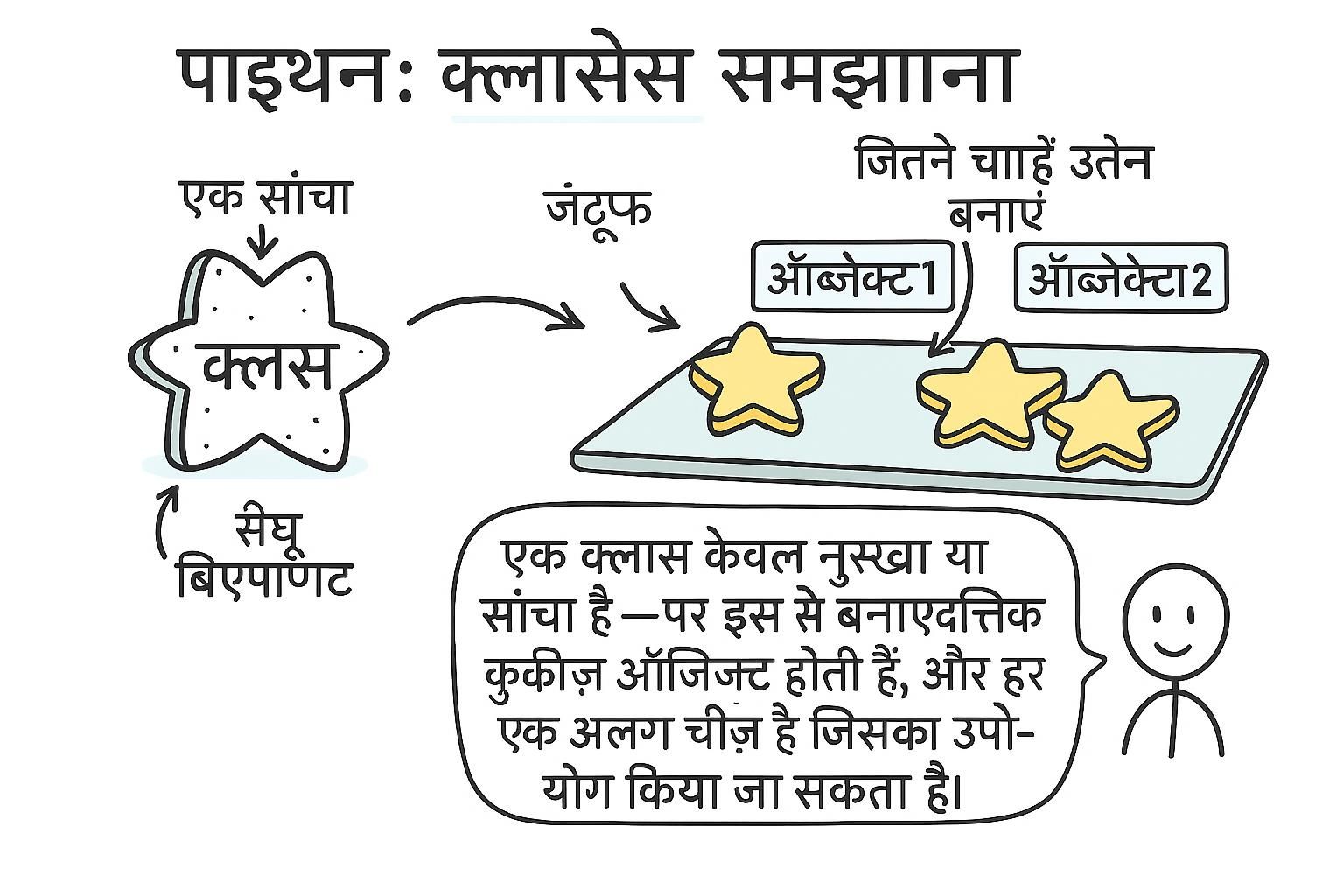
Blueprint और instances

एक कक्षा एक blueprint है। एक instance उस blueprint से बनी एक विशिष्ट चीज़ है। आप जितने चाहें उतने instances बना सकते हैं, प्रत्येक के अपने डेटा के साथ लेकिन कक्षा में परिभाषित विधियों को साझा करते हुए।

एक कक्षा संरचना और व्यवहार को परिभाषित करती है। Instances उस कक्षा से बनी ऑब्जेक्ट हैं: प्रत्येक अपना डेटा रखता है लेकिन कक्षा की method objects को साझा करता है। एक instance बनाना कक्षा को एक function की तरह कॉल करता है: Dog() एक नया Dog instance बनाता है।

एक कक्षा को कॉल करने से दो चीजें क्रम में होती हैं: यह एक खाली instance allocate करता है, फिर इसे भरने के लिए इस पर __init__ चलाता है। समाप्त वस्तु अपनी कक्षा को याद रखती है (आप इसे type(rex) के रूप में वापस पढ़ सकते हैं), और यह लिंक यह है कि Python को कैसे पता चलता है कि जब आप rex.bark() को कॉल करते हैं तब कौन सी method को खोजना है: यह पहले instance पर देखता है, फिर कक्षा पर। व्यावहारिक takeaway यह है कि methods एक जगह पर रहते हैं (कक्षा पर, साझा), जबकि डेटा per instance रहता है, इसलिए एक हजार Dog objects आपको डेटा के हजार sets की cost देते हैं लेकिन प्रत्येक method की केवल एक copy देते हैं।

python
class Dog:
    def bark(self):
        print("Woof!")

rex = Dog()
luna = Dog()

rex.bark()    # "Woof!"
luna.bark()   # "Woof!"

Dog कक्षा है। rex और luna instances हैं: दो अलग-अलग कुत्ते, प्रत्येक कक्षा में परिभाषित एक ही व्यवहार को साझा करते हैं।

JunoBlueprint और instances एक कक्षा blueprint है, एक instance इससे बनी एक चीज़ है। कक्षा को एक function की तरह कॉल करें, Dog(), और आपको एक ताज़ा instance वापस मिलता है। हर instance कक्षा की methods को साझा करता है लेकिन अपना डेटा रखता है, इसलिए rex और luna एक जैसा व्यवहार कर सकते हैं जबकि अलग-अलग कुत्ते होते हैं।
JunoBlueprint और instancesDog() को कॉल करने से एक instance मिलता है: इसका अपना डेटा, कक्षा की साझा methods। यह बंडलिंग पूरे मुद्दे की है, संबंधित values और उन पर काम करने वाली code एक साथ चलती हैं जो loose variables की जगह आप हाथ से पास करते हैं।
JunoBlueprint और instances एक कक्षा को कॉल करने से एक खाली ऑब्जेक्ट allocate होता है, फिर इस पर `__init__` चलता है। Methods कक्षा पर एक बार बैठते हैं और साझा होते हैं, डेटा per instance बैठता है, इसलिए `rex` पर एक method कॉल instance को देखकर और फिर कक्षा को देखकर खोजा जाता है। यह विभाजन ही है कि क्यों दस हजार instances सस्ते रहते हैं।

__init__ और self

__init__ method है जिसे Python स्वचालित रूप से कॉल करता है जब आप एक नया instance बनाते हैं। यह वह जगह है जहाँ आप ऑब्जेक्ट के लिए शुरुआती डेटा सेट करते हैं। self यह है कि एक method अपने को संदर्भित करता है जिस विशिष्ट instance पर काम कर रहा है, और यह हमेशा पहला parameter है।

__init__ एक ताज़े allocate किए गए instance को initialize करता है। self हर instance method के पहले parameter के लिए एक conventional नाम है; Python instance को स्वचालित रूप से पास करता है जब आप alice.display() को कॉल करते हैं। self के अंदर __init__ में सेट किए गए Attributes instance attributes हैं: प्रत्येक instance के पास अपनी copy है।

__init__ पहले से allocate किए गए instance पर चलता है और इसे सेट करता है। self एक keyword नहीं है, यह पहला parameter है, और Python इसे आपके लिए भरता है: जब आप alice.display() को कॉल करते हैं, तो Python behind the scenes alice को self के रूप में पास करता है। self.attr = value सेट करने से उस एक instance में लिखा जाता है, इसलिए दो Player objects कभी एक दूसरे के डेटा पर नहीं चलते हैं। एक चीज़ जो सख्त languages से आने वाले लोगों को हैरान करती है: Python आपको कहीं भी attributes जोड़ने देता है, केवल __init__ में नहीं, इसलिए एक typo जैसे self.scor = 0 एक नया attribute बनाता है raising के बजाय। एक instance को जो कभी भी हो attribute सेट करें, __init__ में सेट करें, यहाँ तक कि None के लिए भी, इसलिए ऑब्जेक्ट का shape एक जगह पर declared है और एक typo कहीं और ध्यान में आता है।

python
class Player:
    def __init__(self, name, score=0):
        self.name = name
        self.score = score

    def add_points(self, points):
        self.score += points

    def display(self):
        print(f"{self.name}: {self.score} points")

alice = Player("Alice")
bob = Player("Bob", score=50)

alice.add_points(30)
alice.display()   # "Alice: 30 points"
bob.display()     # "Bob: 50 points"

self.name और self.score instance attributes हैं: वे विशिष्ट ऑब्जेक्ट से संबंधित हैं, कक्षा से नहीं। प्रत्येक Player instance के पास अपना name और score है।

Juno__init__ और self__init__ उस पल चलता है जब आप एक instance बनाते हैं, इसलिए यह वह जगह है जहाँ आप self.name = value के साथ शुरुआती डेटा सेट करते हैं। self वह instance है जिस पर Python काम कर रहा है, और यह हमेशा एक method का पहला parameter है, आपको स्वचालित रूप से सौंपा गया। आप कभी alice.display() को कॉल करते समय self को स्वयं पास नहीं करते हैं।
Juno__init__ और self__init__ एक ताज़े instance को सेट करता है, और कुछ भी जो आप self पर __init__ में स्टोर करते हैं वह एक instance attribute है, एक object प्रति copy। self हर instance method का पहला parameter है; Python instance को आपके लिए पास करता है जब आप alice.display() लिखते हैं, आप definition में केवल इसका नाम रखते हैं।
Juno__init__ और selfself instance है, हर कॉल पर आपके लिए पास किया गया, और self.attr को लिखना उस एक ऑब्जेक्ट पर उतरता है। Python आपको `__init__` के बाहर attributes जोड़ने से नहीं रोकता, इसलिए एक misspelled self.scor चुपचाप एक नया attribute बनाता है। हर attribute को __init__ में declare करें, यहाँ तक कि None के रूप में, और typos के पास छिपने का कहीं नहीं है।

Methods

कोई भी function एक कक्षा के अंदर परिभाषित एक method है। Instance methods हमेशा self को पहले parameter के रूप में रखते हैं; Python इसे स्वचालित रूप से पास करता है। Methods instance के डेटा को self के माध्यम से पढ़ और बदल सकते हैं।

Instance methods नियमित functions हैं जो कक्षा पर stored हैं। जब आप instance.method को access करते हैं, Python एक bound method को hand करता है: समान function जिसमें instance पहले से ही self के रूप में wired है, इसलिए आप केवल शेष arguments पास करते हैं। एक method से self को returning enable करता है chaining: obj.scale(2).rotate(90)

एक method कक्षा पर एक function है, हर instance द्वारा साझा किया गया। c.scale को accessing आपको raw function नहीं देता, यह आपको एक bound method देता है: उसी function को c पहले से ही wired के साथ self के रूप में, जो यह है कि self कैसे बिना आप इसे किए पास होता है। Production code में दो patterns भुगतान करते हैं। एक mutating method से self को returning आपको एक fluent interface देता है (chained calls जैसे c.scale(2).scale(0.5)); इसे builder-style objects के लिए reserve करें जहाँ chaining अच्छी तरह से पढ़ता है, सबकुछ के लिए नहीं, क्योंकि एक method जो self return करता है और एक जो एक नई value return करता है call site पर identical दिखाई देते हैं। और क्योंकि एक bound method एक first-class value है, आप एक को store कर सकते हैं (handler = obj.save) और इसे बाद में कॉल कर सकते हैं, जो callbacks और event handlers पर निर्भर करता है।

python
class Circle:
    def __init__(self, radius):
        self.radius = radius

    def area(self):
        return 3.14159 * self.radius ** 2

    def scale(self, factor):
        self.radius *= factor
        return self    # returning self allows chaining: c.scale(2).scale(0.5)

c = Circle(5)
print(c.area())    # 78.53975
c.scale(2)
print(c.area())    # 314.159
JunoMethods एक method एक कक्षा के अंदर परिभाषित function है, और इसका पहला parameter हमेशा self है, जिस instance पर यह काम कर रहा है। Python self को आपके लिए पास करता है, इसलिए आप c.area() को कुछ भी extra के साथ कॉल करते हैं। self के माध्यम से एक method उस ऑब्जेक्ट के अपने डेटा को पढ़ और बदलता है।
JunoMethods Methods कक्षा पर plain functions हैं; एक instance के माध्यम से उन्हें reach करना स्वचालित रूप से self को bind करता है, इसलिए आप बाकी को पास करते हैं। self को return करें जब आप chaining चाहते हैं जैसे c.scale(2).scale(0.5)। अन्यथा caller जो पूछा है उस value को return करें।
JunoMethodsobj.method आपको एक bound method देता है, function जिसमें obj self के रूप में wired है, जो यह है कि आप इसे कभी पास क्यों नहीं करते। self को returning fluent chaining खरीदता है, builders के लिए काबिलेकदर, confusing अगर हर method ऐसा करता है। और क्योंकि एक bound method एक value है, handler = obj.save इसे एक callback के लिए स्टैश करता है।

Class variables बनाम instance variables

Variables सीधे कक्षा पर परिभाषित (__init__ के अंदर नहीं) class variables हैं। सभी instances एक ही class variable को साझा करते हैं। Variables self पर __init__ के अंदर सेट किए गए instance variables हैं, प्रत्येक ऑब्जेक्ट के लिए अनोखे।

एक class variable कक्षा पर एक बार stored है और हर instance द्वारा साझा है। एक instance variable व्यक्तिगत ऑब्जेक्ट पर stored है। जब आप self.attr को पढ़ते हैं, Python पहले instance को check करता है, फिर कक्षा। जब आप self.attr = value लिखते हैं, यह हमेशा instance की own copy को बनाता या update करता है, उस ऑब्जेक्ट के लिए केवल class variable को छुपाता है।

self.attr को reading instance को check करता है, फिर कक्षा, इसलिए एक class variable एक shared default के रूप में काम करता है जब तक कि कुछ instance अपना value न लिखे और इसे shadow न करे। Production में जो trap काटता है वह एक mutable class variable है (एक जिसे आप जगह पर change कर सकते हैं, list या dict की तरह)। self.x = ... को assigning एक निजी copy बनाता है, लेकिन self.x.append(...) नहीं: यह एक shared ऑब्जेक्ट को reach करता है और हर instance परिवर्तन देखता है। अगर आप एक per-instance list चाहते हैं, तो इसे __init__ में self.history = [] के साथ बनाएं, कभी नहीं class-level history = [] के रूप में। Class variables को उन चीज़ों के लिए reserve करें जो वास्तव में shared हैं, और उन्हें immutable रखें: constants, defaults, counters।

python
class Player:
    max_lives = 3    # class variable, same for every Player

    def __init__(self, name):
        self.name = name   # instance variable, unique to each Player
        self.lives = Player.max_lives

    def die(self):
        self.lives -= 1

alice = Player("Alice")
bob = Player("Bob")

Player.max_lives = 5    # change for all current and future instances

सभी instances के पार shared values के लिए class variables use करें: constants, counters, defaults। Data के लिए instance variables use करें जो प्रति ऑब्जेक्ट अलग होता है।

JunoClass variables बनाम instance variables एक variable सीधे कक्षा पर सेट किया गया हर instance द्वारा साझा है; एक variable `__init__` में `self` पर सेट किया गया उस ऑब्जेक्ट से संबंधित है। self.attr = value को लिखना हमेशा instance की own copy को बनाता या update करता है। इसलिए class variables के लिए reach करें जब एक value सभी के लिए एक ही हो, instance variables जब यह प्रति ऑब्जेक्ट अलग हो।
JunoClass variables बनाम instance variables `self.attr` को reading instance को check करता है, फिर कक्षा, इसलिए एक class variable एक shared default है। `self.attr = value` को लिखना हमेशा instance पर उतरता है और उस ऑब्जेक्ट के लिए class variable को छुपाता है। Constants और defaults के लिए class variables रखें, per-object state `self` पर जाता है।
JunoClass variables बनाम instance variables शांत bug एक mutable class variable है: `self.x = ...` एक निजी copy बनाता है लेकिन `self.x.append(...)` एक shared ऑब्जेक्ट को mutate करता है, इसलिए हर instance इसे देखता है। एक per-instance list चाहते हैं, इसे `__init__` में `self.history = []` के साथ बनाएं, कभी नहीं `history = []` class level पर।

__str__ और __repr__

__str__ नियंत्रित करता है कि print() और f-strings आपकी ऑब्जेक्ट के लिए क्या दिखाते हैं। __repr__ नियंत्रित करता है console में दिखाया गया developer view और debugging के लिए। हमेशा __repr__ को define करें। __str__ को define करें जब आप एक साफ user-facing display चाहते हैं जो debug view से अलग हो।

__str__ को str(), print(), और output अध्याय से f-strings द्वारा कॉल किया जाता है, user-facing text। __repr__ को repr() द्वारा कॉल किया जाता है और दिखाया जाता है जब एक ऑब्जेक्ट console में print होता है, developer view। अगर केवल __repr__ को define किया जाता है, Python इसे दोनों के लिए use करता है। Convention: __repr__ एक string return करता है जो ऑब्जेक्ट को recreate करने के लिए code की तरह दिखता है; __str__ एक readable summary return करता है।

ये दोनों dunder methods हैं (short for double-underscore: methods जिन्हें leading और trailing __ के साथ नाम दिया गया है जो Python सही पल पर आपके लिए कॉल करता है)। print(obj) और str(obj) __str__ को कॉल करते हैं, जब कोई __str__ नहीं हो तो __repr__ को fallback करते हैं। repr(obj), और एक ऑब्जेक्ट console में bare दिखाया गया, __repr__ को कॉल करते हैं। इसलिए __repr__ वह है जिसके पास हमेशा job है, जो यह है कि rule यह है: हमेशा __repr__ को define करें, __str__ को केवल तभी add करें जब user-facing text debug text से अलग हो। __repr__ को constructor कॉल जैसा बनाएं जो ऑब्जेक्ट को बनाता है (Player(name='Alice', score=87)) और fields पर !r को use करें, इसलिए strings अपने quotes रखते हैं और एक stray space या newline छिपने की जगह दिखाई देता है। एक अच्छा __repr__ वह है जो एक log line या stack trace को 2am पर readable बनाता है।

python
class Player:
    def __init__(self, name, score):
        self.name = name
        self.score = score

    def __str__(self):
        return f"{self.name} ({self.score} pts)"

    def __repr__(self):
        return f"Player(name={self.name!r}, score={self.score})"

alice = Player("Alice", 87)
print(alice)        # "Alice (87 pts)"   (uses __str__)
repr(alice)         # "Player(name='Alice', score=87)"  (uses __repr__)

हमेशा __repr__ को define करें। __str__ को define करें जब आप एक साफ user-facing representation चाहते हैं जो debug view से अलग हो। अगर केवल __repr__ को define किया जाता है, Python इसे दोनों के लिए use करता है।

Juno__str__ और __repr____str__ यह है जो print() और f-strings दिखाते हैं, friendly version। __repr__ developer view है जो आप console में देखते हैं। हमेशा __repr__ को लिखें; यह वह है जिसके पास job है यहाँ तक कि जब आप __str__ को भूल जाएं। __str__ को केवल तभी add करें जब user-facing text अलग तरीके से पढ़ना चाहिए।
Juno__str__ और __repr____str__ readable version है print() और f-strings के लिए; __repr__ debug version है, और Python इसे fallback करता है जब कोई __str__ नहीं हो। हमेशा __repr__ को define करें, इसे कॉल की तरह बनाएं जो ऑब्जेक्ट को बनाता है, और आप अपने आप को बचाते हैं बाद में जब एक ऑब्जेक्ट log में दिखाई दे।
Juno__str__ और __repr____repr__ हमेशा job है, __str__ केवल जब user view अलग होना चाहिए, तो __repr__ को पहले और हर बार define करें। इसे constructor की तरह shape दें और fields पर !r लगाएं, इसलिए stray space या newline दिखाई देता है छिपने की जगह। यह एक habit है जो 2am stack trace को readable बनाता है।

Private convention

Python के पास कोई real private variables नहीं हैं, लेकिन एक नाम के शुरु में एक underscore (_balance) एक convention है जो signal करता है "यह आंतरिक है, इसे सीधे कक्षा के बाहर from use न करें"। यह language द्वारा enforce नहीं है; यह अन्य developers को एक communication है।

एक single underscore (_attr) एक convention है जो internal use को signal करता है। Python इसे enforce नहीं करता, लेकिन सभी linters, IDEs, और developers इसे respect करते हैं। एक double underscore (__attr) name mangling को trigger करता है: Python इसे _ClassName__attr में rewrites करता है, जो subclasses में accidental collision को रोकता है। यह true privacy नहीं है; यह एक collision-avoidance mechanism है।

एक single underscore केवल convention है: कुछ भी इसे enforce नहीं करता, लेकिन linters (tools जो आपके code को style और likely bugs के लिए scan करते हैं), editors, और reviewers सभी _balance को "internal, बाहर से touch न करें" के रूप में पढ़ते हैं। एक double underscore name mangling को trigger करता है: Python __attr को _ClassName__attr में rewrites करता है इसलिए एक subclass अपना __attr define करने से parent के साथ accidentally clash नहीं कर सकता। यह एक collision guard है, privacy नहीं: अगर कोई insist करे तो mangled name अभी भी बाहर से reachable है। इसे केवल एक base class के लिए reach करें जो widely subclass होने के लिए meant है, जहाँ आप एक attribute चाहते हैं जो subclasses पर नहीं step कर सकते; ordinary code में एक single underscore सही default है और double underscore मुख्य रूप से confusion बनाता है। अगर आप arbitrary attributes को set होने से रोकना चाहते हैं (पहले से typo'd self.scor), __slots__ को attribute names की fixed list के साथ define करें: यह Python को बताता है वह केवल attribute हैं जो एक instance के पास हो सकते हैं, इसलिए कोई अन्य assignment raise करता है silently sticking की जगह, और यह per-instance memory को trim करता है एक bonus के रूप में।

python
class BankAccount:
    def __init__(self, balance):
        self._balance = balance    # _ means "hands off"

    def deposit(self, amount):
        if amount > 0:
            self._balance += amount

    def balance(self):
        return self._balance

एक double underscore (__name) name mangling को trigger करता है; Python attribute को _ClassName__name में rename करता है subclasses में conflicts को avoid करने के लिए। यह rarely needed है। Single underscore अधिकांश code में convention है।

JunoPrivate convention Python के पास real private variables नहीं हैं, लेकिन एक leading underscore (_balance) "internal, इससे बाहर रहें" के लिए agreed signal है। कुछ भी आपको अंदर reach करने से नहीं रोकता, यह अन्य developers को एक message है, जिसमें future you भी शामिल है। Double underscore subclasses में name clashes को avoid करने के लिए एक rarer tool है; single underscore वह है जिसे आप दिन में रोज़ use करेंगे।
JunoPrivate convention एक single underscore का मतलब "internal" है, और हर tool और reviewer इसे respect करते हैं यहाँ तक कि Python enforce न करे। एक double underscore name mangling को trigger करता है _ClassName__attr में, जो subclass name clashes को guard करता है, access को नहीं। Default द्वारा single underscore के लिए reach करें; double rare है।
JunoPrivate convention Single underscore convention है, double underscore _ClassName__attr में mangles करता है subclass clashes को रोकने के लिए, न ही real privacy है। widely-subclassed base classes के लिए __attr__ को रखें; जहाँ भी confusion add करता है। Outright stray attributes को ban करना चाहते हैं और typo'd self.scor को catch करना चाहते हैं, __slots__ को fixed list में सेट करें।

Inheritance

एक कक्षा दूसरी कक्षा से inherit कर सकती है, सभी attributes और methods को स्वचालित रूप से प्राप्त कर सकती है। आप फिर subclass में specific methods को override कर सकते हैं उनके behaviour को change करने के लिए। यह आपको एक common base को reuse करने और जहाँ need हो वहाँ specialise करने देता है।

Inheritance एक "is-a" relationship को model करता है: एक Dog एक Animal है। Subclass parent की सभी methods और attributes प्राप्त करता है और उनमें से किसी को override कर सकता है अपने version को define करके। जब आप एक method को कॉल करते हैं, Python subclass पर देखता है पहले, फिर parent तक चलता है, इसलिए एक unoverridden method automatically fall through करता है। यह lookup path method resolution order (MRO) है, classes की ordered list जिसे Python search करता है।

जब आप obj.method को कॉल करते हैं, Python एक fixed order में classes को search करता है, MRO (method resolution order: एक class की flattened list और इसके ancestors, जो Dog.__mro__ के रूप में readable है), और पहली match को use करता है। Single inheritance straightforward है, subclass फिर parent। MRO के लिए कारण multiple inheritance और diamond case है (दो parents जो दोनों एक common grandparent से inherit करते हैं): Python classes को order करता है इसलिए grandparent एक बार दिखाई देता है, दोनों parents के बाद, और calls को deterministically resolve करता है। Practical guidance: shallow hierarchies और single inheritance को prefer करें, क्योंकि deep या multiple-inheritance trees "कौन सी method actually चली" को reason करना मुश्किल बनाते हैं। जब आप multiple bases को mix करते हैं, हर __init__ को super() के माध्यम से route करें (अगला section) इसलिए हर एक exactly एक बार उस order में चलता है।

python
class Animal:
    def __init__(self, name):
        self.name = name

    def speak(self):
        return "..."

class Dog(Animal):
    def speak(self):
        return f"{self.name} says Woof!"

class Cat(Animal):
    def speak(self):
        return f"{self.name} says Meow!"

pets = [Dog("Rex"), Cat("Luna"), Dog("Max")]
for pet in pets:
    print(pet.speak())

Dog और Cat Animal से __init__ को inherit करते हैं, इसलिए उन्हें अपना नहीं चाहिए। वे speak() को अपने specific behaviour के साथ override करते हैं।

JunoInheritance एक subclass parent के पास सबकुछ inherit करता है, फिर केवल उन methods को override करता है जिन्हें change करना चाहता है। कुछ भी जिसे आप override न करें parent को fall through करता है free के लिए, जो पूरे मुद्दे की है: shared behaviour को एक बार लिखें, जहाँ यह अलग हो वहाँ specialise करें। `Dog` और `Cat` `Animal` के `__init__` को reuse करते हैं और केवल `speak()` को redefine करते हैं।
JunoInheritance Inheritance "is-a" है: subclass parent की methods प्राप्त करता है और जिन्हें चाहता है override करता है, और unoverridden calls fall through करती हैं। Python एक method को MRO को walking के द्वारा खोजता है, subclass पहले, फिर parent तक। Shared base को reuse करें, केवल वह redefine करें जो अलग हो।
JunoInheritance Python एक method को MRO को walking के द्वारा resolve करता है और पहली match को लेता है, जो diamond case को deterministic बनाता है। Hierarchies को shallow रखें और single inheritance पर lean करें; deep या multiple-inheritance trees "कौन सी method चली" को guessing game में बदल देते हैं। जब आप must mix bases करते हैं, हर `__init__` को `super()` के माध्यम से chain करें।

super()

super() parent class से एक method को कॉल करता है। इसे use करें जब आप parent के behaviour को extend करना चाहते हैं rather than पूरी तरह से replace करते हैं: parent के __init__ को कॉल करें इसके setup को चलाने के लिए, फिर कुछ भी अपने subclass को need है top पर add करें।

super() एक proxy object return करता है जो method calls को MRO में अगली कक्षा को delegate करता है। हमेशा super().__init__() को एक subclass __init__ से कॉल करें जब parent के पास एक हो। इसे skip करने का मतलब parent का setup code नहीं चलता, जो ऑब्जेक्ट को broken state में छोड़ सकता है।

super() का मतलब "my direct parent" नहीं है, इसका मतलब है "अगली कक्षा MRO के साथ" (पिछले section से lookup order)। एक plain subclass में वह अगली कक्षा parent है, इसलिए distinction academic दिखता है, लेकिन यह exactly वह है जो multiple inheritance को काम करता है: अगर tree में हर कक्षा super().__init__(...) को कॉल करता है, हर __init__ एक बार चलता है, MRO order में, कोई कक्षा hard-coding parent by name के साथ। यह है कि आप super().__init__() क्यों लिखते हैं और नहीं Animal.__init__(self): parent को directly name करना chain को break करता है moment एक दूसरी कक्षा mixed हो जाती है, और एक shared base को दो बार चला सकता है। Bare super() कोई arguments के साथ modern form है; older super(Dog, self) एक ही चीज़ है spelled out, जिसे आप अभी भी code में देखेंगे जो older versions को target करता है।

python
class Animal:
    def __init__(self, name, sound):
        self.name = name
        self.sound = sound

class Dog(Animal):
    def __init__(self, name):
        super().__init__(name, "Woof")   # call Animal.__init__
        self.tricks = []                  # add something extra

    def learn(self, trick):
        self.tricks.append(trick)

rex = Dog("Rex")
rex.learn("sit")
print(rex.tricks)   # ["sit"]

हमेशा super().__init__() को कॉल करें जब आपके subclass के पास अपना __init__ हो और parent के पास भी हो।

Junosuper()super() parent class को reach करता है, इसलिए super().__init__() parent का setup चलाता है अपनी चीज़ें add करने से पहले। इसे use करें जब आपका subclass अपना `__init__` लिखता है और parent के पास एक भी हो। इसे skip करें और parent का setup कभी नहीं चलता, ऑब्जेक्ट को half-built छोड़ते हुए।
Junosuper()super() अगली कक्षा तक delegates करता है, इसलिए एक subclass `__init__` से super().__init__() को कॉल करें जब भी parent के पास एक हो। इसे भूल जाएं और parent का setup skip हो जाता है, जो ऑब्जेक्ट को broken state में छोड़ सकता है। यह line है जो आपके subclass को parent को wire करती है जिसे यह extend करता है।
Junosuper()super() का मतलब है "MRO में अगली कक्षा", "my parent" नहीं, जो यह है कि hard-coding `Animal.__init__(self)` chain को break क्यों करता है जब class mixed हो जाती है। अगर हर `__init__` को `super()` कॉल करता है, हर एक order में एक बार चलता है। Bare `super()` modern form है; `super(Dog, self)` एक ही चीज़ है spelled out।

Class methods और static methods

@classmethod एक method बनाता है जो instance की जगह class को receive करता है। यह alternative constructors के लिए उपयोगी है: एक string, एक file, या दूसरे format से एक instance बनाना। @staticmethod एक plain function है जो organisational reasons के लिए class के अंदर रहती है; यह instance न तो class को receive करता है।

@classmethod अपने पहले argument के रूप में cls (कक्षा) को receive करता है, instance नहीं। Primary use alternative constructors हैं जो different input formats से instances बनाते हैं। @staticmethod एक नियमित function है class के तहत namespaced; इसके पास कक्षा या instance तक access नहीं है। Constructors के लिए @classmethod का use करें, utility functions के लिए @staticmethod का जो logically class से tied हों।

@classmethod instance की जगह class को अपने पहले argument (cls) के रूप में receive करता है, और detail जो इसे अपनी जिम्मेदारी देता है वह यह है कि cls वह कक्षा है जिस पर method को कॉल किया गया था, न कि जहाँ यह define किया गया था। इसलिए अगर Player.from_string cls(...) के साथ बनाता है और एक subclass ProPlayer ProPlayer.from_string(...) को कॉल करता है, यह एक ProPlayer बनाता है, Player नहीं। यह बिल्कुल वही है कि alternate constructors क्यों @classmethod use करते हैं hard-code करने की जगह class name: वे inheritance के तहत काम करते हैं। @staticmethod न तो instance को न class को लेता है; यह एक plain function है class के अंदर parked namespacing के लिए, जब logic class के साथ belong करता है लेकिन इसके डेटा को कोई नहीं चाहिए। एक classmethod reach करें जब आप एक instance को कुछ अन्य format से बना रहे हैं, एक staticmethod एक संबंधित helper के लिए, और एक normal method कुछ भी जो एक ऑब्जेक्ट के डेटा को touch करता है।

python
class Player:
    def __init__(self, name, score):
        self.name = name
        self.score = score

    @classmethod
    def from_string(cls, data):
        name, score = data.split(",")
        return cls(name, int(score))

alice = Player.from_string("Alice,87")
python
class Player:
    @staticmethod
    def is_valid_name(name):
        return name.isalpha() and len(name) >= 2

Player.is_valid_name("Alice")   # True
Player.is_valid_name("A1")      # False

Alternative constructors के लिए @classmethod का use करें। Utility functions के लिए @staticmethod का use करें जो logically class के साथ belong करते हैं लेकिन instance या class data की need नहीं है।

JunoClass methods और static methods@classmethod आपको class की जगह instance देता है, जो इसे alternative constructors के लिए go-to बनाता है: एक `Player` को string, file, जो format भी आपके पास हो से बनाएं। @staticmethod एक ordinary function है class के अंदर tidiness के लिए tucked; यह class न तो instance को न class को लेता है। Plain methods एक ऑब्जेक्ट के डेटा को touch करते हैं, ये दोनों नहीं।
JunoClass methods और static methods@classmethod `cls` लेता है, कक्षा itself, इसलिए इसे alternative constructors के लिए use करें जो `cls(...)` return करते हैं। @staticmethod कुछ नहीं implicit लेता, एक helper class के तहत namespaced। Method per-object data के लिए, classmethod instances को build करने के लिए, staticmethod एक संबंधित utility के लिए।
JunoClass methods और static methods एक classmethod constructor का point यह है कि `cls` वह है जिसने इसे कॉल किया, इसलिए `ProPlayer.from_string(...)` एक `ProPlayer` बनाता है, `Player` नहीं। Class name को hard-code करें और आप वह खो देते हैं। Classmethod construct करने के लिए, staticmethod एक संबंधित helper के लिए जिसे कोई data चाहिए, normal method सबकुछ के लिए जो instance को touch करता है।

@property

@property आपको एक method को attribute की तरह access करने देता है, कोई parentheses की need नहीं। इसे values के लिए use करें जो अन्य attributes से computed हैं और simple attribute access के रूप में पढ़ने के लिए natural feel करते हैं।

@property एक method को एक read-only attribute में बदल देता है। Method run होता है जब attribute को access किया जाता है। यह computed values के लिए उपयोगी है जो stored data से derived हैं, और attribute access को validation जोड़ने के लिए public interface को बदले बिना। एक paired @name.setter attribute को writable बनाता है।

@property एक method को कुछ में turn करता है जिसे आप एक attribute की तरह पढ़ते हैं: c.area, कोई parentheses नहीं, हर बार method चलता है। @area.setter को add करें और यह writable भी बन जाता है, आपके code के साथ जाने के रास्ते पर चलते हुए, जो validation जाता है (एक negative radius को reject करें इससे पहले कि यह store हो)। Real value यह है कि यह कुछ भी नहीं बदलता है callers के लिए: आप एक plain self.radius attribute के साथ शुरू कर सकते हैं और बाद में इसे एक property में promote कर सकते हैं validation के साथ बिना एक single line को छुए जो इसे read या write करता है। यह है कि Python के पास कोई getter/setter ceremony नहीं है, आप plain attributes को expose करते हैं और केवल property के लिए reach करते हैं जब एक को computing या guarding की need हो। Production के लिए दो cautions: access free दिखता है लेकिन code चलाता है, इसलिए इसे cheap रखें (एक expensive result को cache करें rather than हर read पर recompute करने के), और एक property जो quietly heavy work करता है या raise करता है जो कोई assume करता था वह एक simple field था को surprise करता है।

python
class Circle:
    def __init__(self, radius):
        self.radius = radius

    @property
    def area(self):
        return 3.14159 * self.radius ** 2

    @property
    def diameter(self):
        return self.radius * 2

c = Circle(5)
print(c.area)      # 78.53975 (looks like an attribute, runs like a method)
print(c.diameter)  # 10

Properties computed values के लिए उपयोगी हैं: चीज़ें जो अन्य attributes से derived हैं जो () के बिना access करने के लिए natural लगती हैं।

Juno@property@property आपको एक method को एक attribute की तरह पढ़ने देता है, कोई parentheses: c.area की जगह c.area()। यह values में fit करता है जो अन्य attributes से काम किए गए हैं और plain data के रूप में पढ़ने के लिए natural लगते हैं। Behind the scenes यह अभी भी हर बार जब आप इसे access करते हैं तब आपकी method चलाता है।
Juno@property@property एक method को एक attribute की तरह पढ़ता है, और एक paired `@name.setter` इसे writable बनाता है इसलिए आप validate कर सकते हैं जाने के रास्ते पर। Win: आप एक plain attribute को बाद में एक property में बदल सकते हैं बिना कोई caller change किए। इसे computed या guarded values के लिए use करें, हर field पर habit नहीं।
Juno@property `@property` को like करने का कारण: एक plain attribute बाद में एक computed-or-validated हो सकता है कोई caller को change किए बिना, इसलिए आप getters और setters को skip करते हैं जब तक आप actually एक की need करते हैं। Access free दिखता है लेकिन code चलाता है, तो इसे cheap रखें, expensive ones को cache करें, और heavy work या raise को जो field की तरह read करता है के पीछे hide न करें।

Practice में

एक Player class instance attributes, methods, एक @property, और __str__ के साथ:

python
class Player:
    max_lives = 3

    def __init__(self, name: str):
        self.name = name
        self.score = 0
        self.lives = Player.max_lives

    def earn_points(self, amount: int) -> None:
        self.score += amount

    def take_hit(self) -> bool:
        self.lives -= 1
        return self.lives > 0

    @property
    def is_alive(self) -> bool:
        return self.lives > 0

    def __str__(self) -> str:
        return f"{self.name} | Score: {self.score} | Lives: {self.lives}"

alice = Player("Alice")
alice.earn_points(50)
alice.take_hit()
print(alice)            # "Alice | Score: 50 | Lives: 2"
print(alice.is_alive)   # True

एक User class जो एक private attribute को एक @property getter के साथ use करता है, एक deactivate method, और एक to_dict serialiser:

python
class User:
    def __init__(self, user_id: int, username: str, email: str):
        self.id = user_id
        self.username = username
        self.email = email
        self._active = True

    @property
    def active(self) -> bool:
        return self._active

    def deactivate(self) -> None:
        self._active = False

    def to_dict(self) -> dict:
        return {
            "id": self.id,
            "username": self.username,
            "email": self.email,
            "active": self._active,
        }

    def __repr__(self) -> str:
        return f"User(id={self.id}, username={self.username!r})"

alice = User(1, "alice", "[email protected]")
print(alice.to_dict())
alice.deactivate()
print(alice.active)   # False

एक DataSplit class जो train/validation slicing को properties के पीछे encapsulate करता है, clean debug output के लिए __repr__ के साथ:

python
class DataSplit:
    def __init__(self, data: list, train_ratio: float = 0.8):
        split = int(len(data) * train_ratio)
        self._train = data[:split]
        self._val = data[split:]

    @property
    def train(self) -> list:
        return self._train

    @property
    def val(self) -> list:
        return self._val

    @property
    def sizes(self) -> tuple[int, int]:
        return len(self._train), len(self._val)

    def __repr__(self) -> str:
        return f"DataSplit(train={len(self._train)}, val={len(self._val)})"

data = list(range(100))
split = DataSplit(data, train_ratio=0.8)
print(split)         # DataSplit(train=80, val=20)
print(split.sizes)   # (80, 20)

_train और _val पर underscore prefix signal करता है कि callers को properties के through जाना चाहिए rather than raw lists को directly mutate करना। Python इसे enforce नहीं करेगा, लेकिन यह एक स्पष्ट contract सेट करता है।